
HC's extension of wpf native Window.
[TemplatePart(Name = ElementNonClientArea, Type = typeof(UIElement))]
public class Window : System.Windows.Window
Attributes
| Property | Description | Default Value | Remarks |
|---|---|---|---|
| CloseButtonBackground | Close button background color | ||
| CloseButtonForeground | Close button foreground color | ||
| CloseButtonHoverBackground | Close button mouse hover background color | ||
| CloseButtonHoverForeground | Close button mouse hover foreground color | ||
| OtherButtonBackground | Other Button Background Color | ||
| OtherButtonForeground | Foreground color of other buttons | ||
| OtherButtonHoverBackground | Other button mouse hover background color | ||
| OtherButtonHoverForeground | Other button mouse hover foreground color | ||
| NonClientAreaContent | NonClientAreaContent | ||
| NonClientAreaBackground | NonClientAreaBackground | NonClientAreaBackground | |
| NonClientAreaForeground | Foreground color of non-client area | ||
| NonClientAreaHeight | NonClientAreaHeight | ||
| ShowNonClientArea | Whether to display non-client area | true | |
| ShowTitle | Whether to show the window title | true | |
| IsFullScreen | Whether the window is in full screen | false | |
| SystemBackdropType | Apply Mica Material for window | false | Only Available in Custom Version |
| ShowCloseButton | Show or Hide Close Button | true | Only Available in Custom Version |
| ShowMaxButton | Show or Hide Max Button | true | Only Available in Custom Version |
| ShowMinButton | Show or Hide Min Button | true | Only Available in Custom Version |
Case
<hc:Window x:Class="HandyControlDemo.Window.CommonWindow"
           xmlns="http://schemas.microsoft.com/winfx/2006/xaml/presentation"
           xmlns:x="http://schemas.microsoft.com/winfx/2006/xaml"
           xmlns:d="http://schemas.microsoft.com/expression/blend/2008"
           xmlns:mc="http://schemas.openxmlformats.org/markup-compatibility/2006"
           xmlns:hc="https://handyorg.github.io/handycontrol"
           mc:Ignorable="d"
           Background="{DynamicResource MainContentBackgroundBrush}"
           WindowStartupLocation="CenterScreen"
           Title="Title"
           Height="450"
           Width="800"
           Icon="/HandyControlDemo;component/Resources/Img/icon.ico">
    <Border Background="{DynamicResource MainContentForegroundDrawingBrush}"/>
</hc:Window>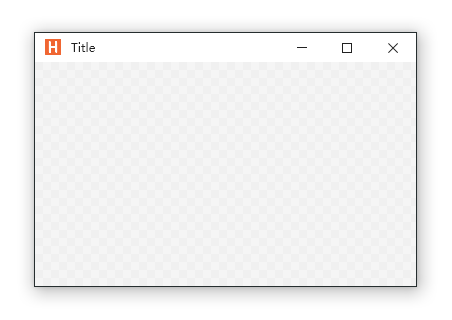
Mica Material
Mica is an opaque, dynamic material that incorporates theme and desktop wallpaper to paint the background of long-lived windows such as apps and settings. Mica is specifically designed for app performance as it only samples the desktop wallpaper once to create its visualization.
NOTE
Mica can only be used on Windows 11 and above
<hc:Window x:Class="HandyControlDemo.MainWindow"
           xmlns="http://schemas.microsoft.com/winfx/2006/xaml/presentation"
           xmlns:x="http://schemas.microsoft.com/winfx/2006/xaml"
           xmlns:hc="https://handyorg.github.io/handycontrol"
           xmlns:local="clr-namespace:WpfApp4"
           SystemBackdropType="Mica">
    <Grid />
</hc:Window>
For synchronization with the Windows theme, set the UsingSystemTheme="True" property in the app.xaml file
<ResourceDictionary>
    <ResourceDictionary.MergedDictionaries>
        <hc:ThemeResources UsingSystemTheme="True" />
        <hc:Theme />
    </ResourceDictionary.MergedDictionaries>
</ResourceDictionary>
WARNING
In XAML if you set a background brush for the window and the line is AFTER SystemBackdropType="Mica", in Windows 11 the Mica effect is applied to the Window but immediately overridden by the background brush, Mica effect goes away.
Some XAML formatter extensions will sort the properties alphabetically. SystemBackdropType is then before Background and the "bug" above occurs.

Attached Properties
you can use WindowAttach Attached Property for dragging window or any control.
IsDragElement
 <hc:Window WindowAttach:IsDragElement="True"
...
/>
SystemBackdropType
you can use SystemBackdropType Attached Property for Activating Mica for any window (System.Window.Window or HandyControl.Controls.Window).
<hc:Window x:Class="HandyControlDemo.MainWindow"
           xmlns="http://schemas.microsoft.com/winfx/2006/xaml/presentation"
           xmlns:x="http://schemas.microsoft.com/winfx/2006/xaml"
           xmlns:hc="https://handyorg.github.io/handycontrol"
           xmlns:local="clr-namespace:WpfApp4"
           hc:WindowAttach.SystemBackdropType="Mica">
    <Grid />
</hc:Window>
or
<Window x:Class="HandyControlDemo.MainWindow"
           xmlns="http://schemas.microsoft.com/winfx/2006/xaml/presentation"
           xmlns:x="http://schemas.microsoft.com/winfx/2006/xaml"
           xmlns:hc="https://handyorg.github.io/handycontrol"
           xmlns:local="clr-namespace:WpfApp4"
           hc:WindowAttach.SystemBackdropType="Mica">
    <Grid />
<Window>
Shortcut
you should use GlobalShortcut.KeyBindings
  <hc:GlobalShortcut.KeyBindings>
        <KeyBinding Modifiers="Control+Alt" Key="E" Command="{Binding GlobalShortcutErrorCmd}"/>
        <KeyBinding Modifiers="Control+Alt" Key="I" Command="{Binding Main.GlobalShortcutInfoCmd, Source={StaticResource Locator}}"/>
    </hc:GlobalShortcut.KeyBindings>
Menu
If you want to use menus in the title bar, you should use NonClientAreaContent property
<hc:Window.NonClientAreaContent>
  <StackPanel VerticalAlignment="Stretch" Orientation="Horizontal">
        <Button Content="About" Style="{StaticResource ButtonCustom}"/>
        <Button Content="Help" Style="{StaticResource ButtonCustom}"/>
        <Menu>
            <MenuItem Header="Repository">
                <MenuItem Header="GitHub"/>
            </MenuItem>
        </Menu>
   </StackPanel>
</hc:Window.NonClientAreaContent>
NonClientAreaContent
If you want to put objects, you should use it in this way
<hc:Window.NonClientAreaContent>
  <!-- Put your objects here -->
</hc:Window.NonClientAreaContent>