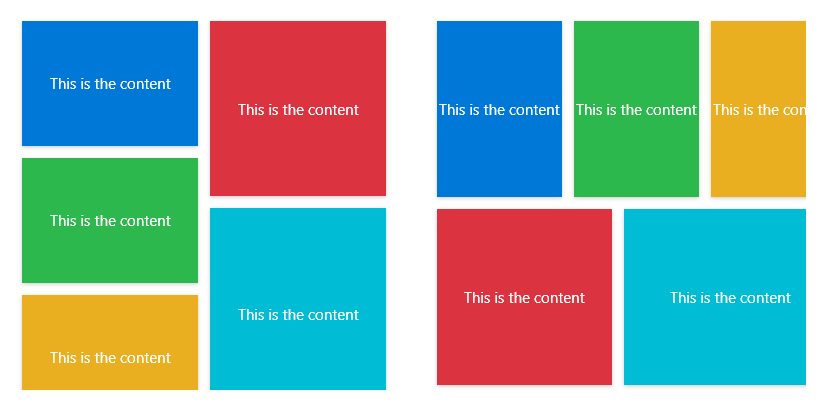
This panel allows elements to be laid out in the same width and unequal height or the same height and unequal width.
cs
public class WaterfallPanel : PanelAttributes
| Property | Description | Default Value | Remarks |
|---|---|---|---|
| AutoGroup | False | ||
| DesiredLength | 0 | ||
| Groups | Number of groups | 2 | The number of columns is the number of columns when the width is equal and the width of the same height is the number of rows |
| Orientation | Arrangement direction | Orientation.Horizontal | Horizontal is equal width and unequal height, Vertical is equal height and unequal width |
Case
xml
<Grid Margin="32">
    <Grid.RowDefinitions>
        <RowDefinition Height="Auto"/>
        <RowDefinition/>
    </Grid.RowDefinitions>
    <hc:NumericUpDown x:Name="UpDownGroups" HorizontalAlignment="Center" Value="2" Minimum="1" Maximum="3" Width="200" Style="{StaticResource NumericUpDownExtend}" hc:TitleElement.Title="Groups" hc:TitleElement.TitleWidth="50" hc:TitleElement.TitlePlacement="Left"/>
    <StackPanel Grid.Row="1" Orientation="Horizontal" Margin="0,16,0,0">
        <hc:ScrollViewer MaxHeight="300">
            <hc:WaterfallPanel VerticalAlignment="Center" Width="300" Groups="{Binding Value,ElementName=UpDownGroups}" hc:PanelElement.FluidMoveBehavior="{StaticResource BehaviorXY200}">
                <Border Height="100" Background="{DynamicResource PrimaryBrush}" Effect="{StaticResource EffectShadow1}" Margin="5">
                    <TextBlock Text="ContentDemoStr" VerticalAlignment="Center" HorizontalAlignment="Center" Foreground="White"/>
                </Border>
                <Border Height="140" Background="{DynamicResource DangerBrush}" Effect="{StaticResource EffectShadow1}" Margin="5">
                    <TextBlock Text="ContentDemoStr" VerticalAlignment="Center" HorizontalAlignment="Center" Foreground="White"/>
                </Border>
                <Border Height="100" Background="{DynamicResource SuccessBrush}" Effect="{StaticResource EffectShadow1}" Margin="5">
                    <TextBlock Text="ContentDemoStr" VerticalAlignment="Center" HorizontalAlignment="Center" Foreground="White"/>
                </Border>
                <Border Height="170" Background="{DynamicResource InfoBrush}" Effect="{StaticResource EffectShadow1}" Margin="5">
                    <TextBlock Text="ContentDemoStr" VerticalAlignment="Center" HorizontalAlignment="Center" Foreground="White"/>
                </Border>
                <Border Height="100" Background="{DynamicResource WarningBrush}" Effect="{StaticResource EffectShadow1}" Margin="5">
                    <TextBlock Text="ContentDemoStr" VerticalAlignment="Center" HorizontalAlignment="Center" Foreground="White"/>
                </Border>
            </hc:WaterfallPanel>
        </hc:ScrollViewer>
        <hc:ScrollViewer Margin="32,0,0,0" HorizontalScrollBarVisibility="Auto" VerticalScrollBarVisibility="Hidden" Orientation="Horizontal" MaxWidth="300">
            <hc:WaterfallPanel VerticalAlignment="Center" Height="300" Orientation="Vertical" Groups="{Binding Value,ElementName=UpDownGroups}" hc:PanelElement.FluidMoveBehavior="{StaticResource BehaviorXY200}">
                <Border Width="100" Background="{DynamicResource PrimaryBrush}" Effect="{StaticResource EffectShadow1}" Margin="5">
                    <TextBlock Text="ContentDemoStr" VerticalAlignment="Center" HorizontalAlignment="Center" Foreground="White"/>
                </Border>
                <Border Width="140" Background="{DynamicResource DangerBrush}" Effect="{StaticResource EffectShadow1}" Margin="5">
                    <TextBlock Text="ContentDemoStr" VerticalAlignment="Center" HorizontalAlignment="Center" Foreground="White"/>
                </Border>
                <Border Width="100" Background="{DynamicResource SuccessBrush}" Effect="{StaticResource EffectShadow1}" Margin="5">
                    <TextBlock Text="ContentDemoStr" VerticalAlignment="Center" HorizontalAlignment="Center" Foreground="White"/>
                </Border>
                <Border Width="170" Background="{DynamicResource InfoBrush}" Effect="{StaticResource EffectShadow1}" Margin="5">
                    <TextBlock Text="ContentDemoStr" VerticalAlignment="Center" HorizontalAlignment="Center" Foreground="White"/>
                </Border>
                <Border Width="100" Background="{DynamicResource WarningBrush}" Effect="{StaticResource EffectShadow1}" Margin="5">
                    <TextBlock Text="ContentDemoStr" VerticalAlignment="Center" HorizontalAlignment="Center" Foreground="White"/>
                </Border>
            </hc:WaterfallPanel>
        </hc:ScrollViewer>
    </StackPanel>
</Grid>