
It can automatically generate a matching editor collection for the attributes in the model object.
cs
[TemplatePart(Name = ElementItemsControl, Type = typeof(ItemsControl))]
[TemplatePart(Name = ElementSearchBar, Type = typeof(SearchBar))]
public class PropertyGrid : Control
Attributes
| Property | Description | Default Value | Remarks |
|---|---|---|---|
| PropertyResolver | Property Resolver | new PropertyResolver | |
| SelectedObject | Model Object | ||
| Description | Description | ||
| MaxTitleWidth | Max Title Width | 0 | |
| MinTitleWidth | Minimum title width | 0 |
Bring your own editor
| Name | Description |
|---|---|
| DatePropertyEditor | Date Editor |
| DateTimePropertyEditor | Date Time Editor |
| EnumPropertyEditor | Enumeration Editor |
| HorizontalAlignmentPropertyEditor | Horizontal Alignment Editor |
| ImagePropertyEditor | Image Editor |
| NumberPropertyEditor | Number Editor |
| PlainTextPropertyEditor | Plain Text Editor |
| ReadOnlyTextPropertyEditor | Read-only text editor |
| SwitchPropertyEditor | Boolean editor (switch style) |
| TimePropertyEditor | Time Editor |
| VerticalAlignmentPropertyEditor | Vertical Alignment Editor |
Events
| Name | Description |
|---|---|
| SelectedObjectChanged | Triggered when the model object changes |
Case
Basic usage
cs
public class PropertyGridDemoModel
{
    [Category("Category1")]
    public string String { get; set; }
    [Category("Category2")]
    public int Integer { get; set; }
    [Category("Category2")]
    public bool Boolean { get; set; }
    [Category("Category1")]
    public Gender Enum { get; set; }
    public HorizontalAlignment HorizontalAlignment { get; set; }
    public VerticalAlignment VerticalAlignment { get; set; }
    public ImageSource ImageSource { get; set; }
}
public enum Gender
{
    Male,
    Female
}
cs
DemoModel = new PropertyGridDemoModel
{
    String = "TestString",
    Enum = Gender.Female,
    Boolean = true,
    Integer = 98,
    VerticalAlignment = VerticalAlignment.Stretch
};
xml
<hc:PropertyGrid Width="500" SelectedObject="{Binding DemoModel}"/>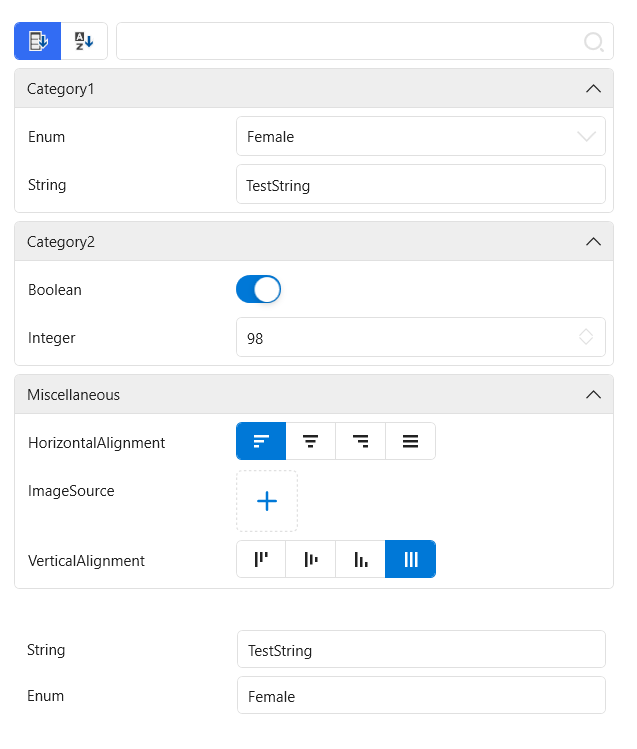
Custom editor
Let's take PlainTextPropertyEditor as an example. When we need to customize the editor, we can inherit from PropertyEditorBase and override some methods. The definitions of these methods are shown in the following table:
Methods
| Name | Description | Remarks |
|---|---|---|
| CreateElement | Create specific operation controls | Must be rewritten |
| CreateBinding | Create data binding for specific operation controls | |
| GetDependencyProperty | Get the dependency property that needs to be bound in the specific operation control | Must be rewritten |
| GetBindingMode | Get binding mode | |
| GetUpdateSourceTrigger | Get the trigger mode of updating the data source | |
| GetConverter | Get the converter to be used when binding |
The specific operation control of the plain text editor can be TextBox:
cs
public override FrameworkElement CreateElement(PropertyItem propertyItem) => new System.Windows.Controls.TextBox
{
    IsReadOnly = propertyItem.IsReadOnly
};
The dependency property that needs to be bound should be TextProperty:
cs
public override DependencyProperty GetDependencyProperty() => System.Windows.Controls.TextBox.TextProperty;The final overall code is as follows:
cs
public class PlainTextPropertyEditor : PropertyEditorBase
{
    public override FrameworkElement CreateElement(PropertyItem propertyItem) => new System.Windows.Controls.TextBox
    {
        IsReadOnly = propertyItem.IsReadOnly
    };
    public override DependencyProperty GetDependencyProperty() => System.Windows.Controls.TextBox.TextProperty;
}