
The DatePicker control allows users to select a date and time by typing the date and time in a textbox, or using the drop-down calendar control.
[TemplatePart(Name = ElementRoot, Type = typeof(Grid))]
[TemplatePart(Name = ElementTextBox, Type = typeof(WatermarkTextBox))]
[TemplatePart(Name = ElementButton, Type = typeof(Button))]
[TemplatePart(Name = ElementPopup, Type = typeof(Popup))]
public class DateTimePicker : Control, IDataInput
Create DateTimePicker
<hc:DateTimePicker />var dateTimePicker = new DateTimePicker();The generated DateTimePicker is shown below:

Select date and time
You can enter the date and time through the textbox, or click the button to the right of the text box to open the drop-down calendar and clock controls to select the date and time.
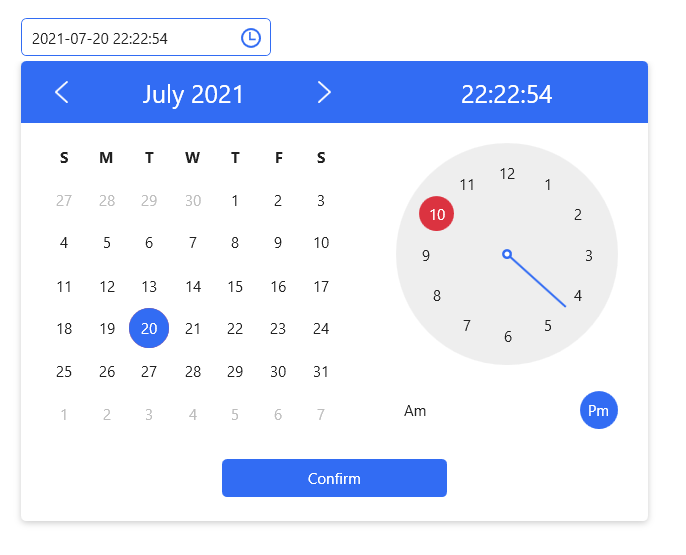
You can also set the date like this in XAML or code.
<hc:DateTimePicker SelectedDateTime="{x:Static system:DateTime.Now}"/>dateTimePicker.SelectedDateTime = DateTime.Now;Set title and placeholder text
You can add Headers and Placeholders to the DatePicker to indicate to the user what they do. To use these two properties, you first need to apply the DateTimePickerExtend or DateTimePickerPlus styles.
<hc:DateTimePicker ShowClearButton="True"
                   Style="{StaticResource DateTimePickerExtend}"
                   hc:InfoElement.Title="This is the title"
                   hc:InfoElement.Placeholder="Please enter the content"/>
Styles
| Available Styles |
|---|
| DateTimePicker.Small |
| DateTimePickerExtend |
| DateTimePickerExtend.Small |
| DateTimePickerPlus |
| DateTimePickerPlus.Small |
Attributes
| Property | Description |
|---|---|
| SelectedDateTime | Get or set the currently selected date and time |
| DateTimeFormat | Gets or sets the format used to display the selected date and time |
| CalendarStyle | Gets or sets the style used when rendering the calendar |
| DisplayDateTime | Get or set the date to be displayed |
| IsDropDownOpen | Gets or sets a value indicating whether the drop-down is on or off Calendar |
| Text | Get the text displayed by DateTimePicker, or set the selected date and time |
| SelectionTextBrush | |
| SelectionOpacity | |
| SelectionBrush | |
| CaretBrushProperty |
Method
| Method | Description |
|---|---|
| VerifyData () | Verify Data |
Events
| Event |
|---|
| PickerClosed |
| PickerOpened |
| SelectedDateTimeChanged |
NOTE
you can change datetimepicker ui culture:
ConfigHelper.Instance.SetLang("en");