
HC has rewritten a set of message dialogs, the usage is the same as the original one.
cs
public sealed class MessageBox : WindowAttributes
| Property | Description | Default Value | Remarks |
|---|---|---|---|
| Message | Message Content | ||
| Image | Message Type Diagram | ||
| ImageBrush | Message type diagram color | ||
| ShowImage | Whether to display the message type schematic diagram | false |
Method
| Name | Description |
|---|---|
| Success(string, string) | Show a success message |
| Info(string, string) | Display a notification message |
| Warning(string, string) | Display a warning message |
| Error(string, string) | Display an error message |
| Fatal(string, string) | Display a serious message |
| Ask(string, string) | Display an inquiry message |
| Show(MessageBoxInfo) | Show a custom message |
| Show(string, string, MessageBoxButton, MessageBoxImage, MessageBoxResult) | Show a message |
| Show(Window, string, string, MessageBoxButton, MessageBoxImage, MessageBoxResult) | Show a message |
Case
cs
MessageBox.Show("a new version has been detected!Do you want to update?", "Title", MessageBoxButton.YesNo, MessageBoxImage.Question);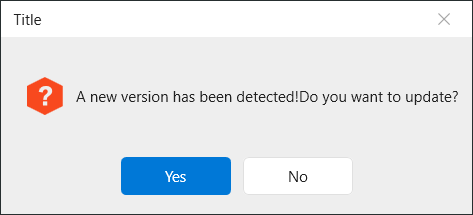
Override styles
you can override styles like this: first in your app.xaml add this:
 <Style x:Key="MessageBoxCustom" TargetType="hc:MessageBox" BasedOn="{StaticResource {x:Type hc:MessageBox}}">
        <Setter Property="NonClientAreaBackground" Value="#262e2f"/>
        <Setter Property="OtherButtonHoverBackground" Value="#888580"/>
        <Setter Property="OtherButtonForeground" Value="White"/>
        <Setter Property="OtherButtonHoverForeground" Value="White"/>
        <Setter Property="NonClientAreaForeground" Value="White"/>
        <Setter Property="CloseButtonForeground" Value="White"/>
 </Style>
now you must set this style in your messagebox:
MessageBox.Show(new MessageBoxInfo
            {
                Message = "Ask",
                Caption = "Title",
                Button = MessageBoxButton.YesNo,
                IconBrushKey = ResourceToken.AccentBrush,
                IconKey = ResourceToken.AskGeometry,
                StyleKey = "MessageBoxCustom"
            });
Customize Button Text
Only Available in Custom Version
MessageBox.Show(new MessageBoxInfo
            {
                Message = "Ask",
                Caption = "Title",
                ConfirmContent = "Ok"
            });