
In the case of retaining the current page status, notify the user and carry related operations.
cs
public class Dialog : ContentControlAttributes
| Property | Description | Default Value | Remarks |
|---|---|---|---|
| IsClosed | Is it closed | ||
| MaskCanClose | |||
| MaskBrush |
Additional attributes
| Name | Description |
|---|---|
| Token | Used to set the message token |
Method
| Name | Description |
|---|---|
| Show(object, string) | Show carried content |
Show<T>(string) | Display the bearer content (automatically instantiate the bearer content) |
| Close() | Close |
| Register(string, FrameworkElement) | Register a message tag for the specified element |
| Unregister(string, Panel) | Unregister the message mark for the specified element |
| Unregister(Panel) | Unregister if the element is registered with a message mark |
| Unregister(string) | Unregister if the message is marked with the corresponding element |
| Close |
Case
Basic usage
xml
<Border x:Class="HandyControlDemo.UserControl.TextDialog"
        xmlns="http://schemas.microsoft.com/winfx/2006/xaml/presentation"
        xmlns:x="http://schemas.microsoft.com/winfx/2006/xaml"
        xmlns:hc="https://handyorg.github.io/handycontrol"
        CornerRadius="10"
        Width="400"
        Height="247"
        Background="{DynamicResource RegionBrush}">
    <hc:SimplePanel>
        <TextBlock Style="{StaticResource TextBlockLargeBold}" Text="Please Wait"/>
        <Button Width="22" Height="22" Command="hc:ControlCommands.Close" Style="{StaticResource ButtonIcon}" Foreground="{DynamicResource PrimaryBrush}" hc:IconElement.Geometry="{StaticResource ErrorGeometry}" Padding="0" HorizontalAlignment="Right" VerticalAlignment="Top" Margin="0,4,4,0"/>
    </hc:SimplePanel>
</Border>
cs
namespace HandyControlDemo.UserControl
{
    public partial class TextDialog
    {
        public TextDialog()
        {
            InitializeComponent();
        }
    }
}
cs
Dialog.Show(new TextDialog());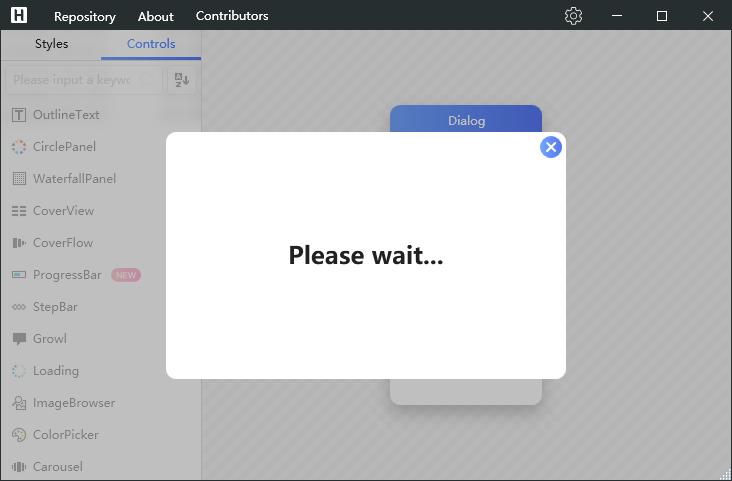
Asynchronously wait for the result to return
After initializing the vm through the Initialize extension method, you can use the GetResultAsync method to achieve asynchronous wait on this basis:
cs
Dialog.Show<InteractiveDialog>()
    .Initialize<InteractiveDialogViewModel>(vm => vm.Message = DialogResult)
    .GetResultAsync<string>()
    .ContinueWith(str => DialogResult = str.Result);
A simpler asynchronous way
cs
var d = Dialog.Show<ProgressDialog>();
await Task.Delay(5 * 1000);
d.Close();
Pop-up behavior
If the token parameter is not given when calling the Show method, it will pop up the currently active window by default. If the value of token is given, the type of the target element will be judged internally. If the type is a window, it will pop up in the decoration layer under the window, otherwise it will look for the child elements of the target element until it finds the type of DialogContainer The child element of will finally pop up inside the child element.
cs
<UserControl hc:Dialog.Token="DialogContainer">
    <hc:DialogContainer>
        // Internal controls
    </hc:DialogContainer>
</UserControl>