
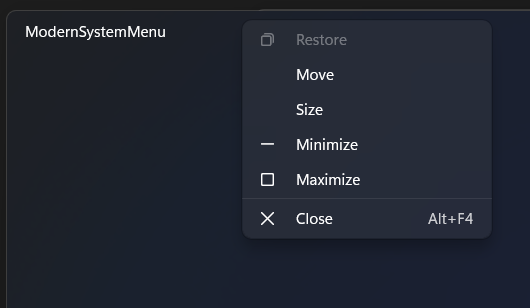
This class provides a modern Fluent-style replacement for the legacy Win32 system menu (right-click on the window title bar). It seamlessly integrates a MenuFlyout into the window, offering a visually consistent and customizable experience that aligns with modern Windows UI principles.
Features:
- Replaces the default system menu with a Fluent-style MenuFlyout.
- Supports light and dark themes, adapting dynamically to system or app theme changes.
- Provides Built-In Commands with CanExecute methods.
- Fully customizable with fluent styling and adaptive UI behavior.
Commands
| Name |
|---|
| RestoreCommand |
| MoveCommand |
| SizeCommand |
| MinimizeCommand |
| MaximizeCommand |
| CloseCommand |
Sample Example
new ModernSystemMenu(window);That's it, now you can right-click on the Windows title bar and enjoy the modern menu.
Advanced Example
You can Extend ModernSystemMenu and create your own MenuFlyout with your own styles and MenuFlyoutItems.
1.Define ModernSystemMenu in your MainWindow.xaml.cs and pass MenuFlyout
public ModernSystemMenu modernSystemMenu;
public MainWindow()
{
    InitializeComponent();
    ExtendsContentIntoTitleBar = true;
    modernSystemMenu = new ModernSystemMenu(this, TitlebarMenuFlyout);
}- Then, Add a MenuFlyout with a
TitlebarMenuFlyoutname in your MainWindow.xaml, you can add it in aGrid.Resourcefor example.
<Window x:Class="Sample.MainWindow"
xmlns="http://schemas.microsoft.com/winfx/2006/xaml/presentation"
xmlns:x="http://schemas.microsoft.com/winfx/2006/xaml"
xmlns:d="http://schemas.microsoft.com/expression/blend/2008"
xmlns:mc="http://schemas.openxmlformats.org/markup-compatibility/2006"
mc:Ignorable="d">
<Grid>
<Grid.Resources>
<MenuFlyout x:Key="TitlebarMenuFlyout"
Placement="BottomEdgeAlignedLeft">
<MenuFlyoutItem Command="{x:Bind modernSystemMenu.RestoreCommand}"
Style="{StaticResource AppTitleBarMenuFlyoutItemStyle}"
Text="Restore">
<MenuFlyoutItem.Icon>
<FontIcon Glyph="" />
</MenuFlyoutItem.Icon>
</MenuFlyoutItem>
<MenuFlyoutItem x:Name="MenuMove"
Command="{x:Bind modernSystemMenu.MoveCommand}"
CommandParameter="{x:Bind MenuMove}"
Style="{StaticResource AppTitleBarMenuFlyoutItemStyle}"
Text="Move" />
<MenuFlyoutItem x:Name="MenuSize"
Command="{x:Bind modernSystemMenu.SizeCommand}"
CommandParameter="{x:Bind MenuSize}"
Style="{StaticResource AppTitleBarMenuFlyoutItemStyle}"
Text="Size" />
<MenuFlyoutItem Command="{x:Bind modernSystemMenu.MinimizeCommand}"
Style="{StaticResource AppTitleBarMenuFlyoutItemStyle}"
Text="Minimize">
<MenuFlyoutItem.Icon>
<FontIcon Glyph="" />
</MenuFlyoutItem.Icon>
</MenuFlyoutItem>
<MenuFlyoutItem Command="{x:Bind modernSystemMenu.MaximizeCommand}"
Style="{StaticResource AppTitleBarMenuFlyoutItemStyle}"
Text="Maximize">
<MenuFlyoutItem.Icon>
<FontIcon Glyph="" />
</MenuFlyoutItem.Icon>
</MenuFlyoutItem>
<MenuFlyoutSeparator Width="200" />
<MenuFlyoutItem Command="{x:Bind modernSystemMenu.CloseCommand}"
Style="{StaticResource AppTitleBarMenuFlyoutItemStyle}"
Text="Close">
<MenuFlyoutItem.Icon>
<FontIcon Glyph="" />
</MenuFlyoutItem.Icon>
<MenuFlyoutItem.KeyboardAccelerators>
<KeyboardAccelerator Key="F4"
Modifiers="Menu" />
</MenuFlyoutItem.KeyboardAccelerators>
</MenuFlyoutItem>
</MenuFlyout>
</Grid.Resources>
</Grid>
</Window>WARNING
Make sure you are using ExtendsContentIntoTitleBar = true; and DevWinUI package is installed. For MenuFlyoutItem we use custom style called ModernSystemMenuFlyoutItemStyle which is included in the DevWinUI package.
Demo
you can run demo and see this feature.