
Secondary (Horizontal) Menu for MenuFlyout.
Property
| Name |
|---|
| AutoCloseByClickOnSecondaryMenuItems |
| SecondaryMenu |
| SecondaryMenuPlacement |
xml
<MenuFlyout dev:MenuFlyoutAttach.AutoCloseByClickOnSecondaryMenuItems="true"
            dev:MenuFlyoutAttach.SecondaryMenuPlacement="Top">
    <dev:MenuFlyoutAttach.SecondaryMenu>
        <dev:MenuFlyoutSecondaryItems>
            <AppBarButton Icon="Cut"
                            Label="Cut" />
            <AppBarSeparator />
            <AppBarButton Icon="SelectAll"
                            Label="Select All" />
            <AppBarSeparator />
            <AppBarButton Icon="Copy"
                            Label="Copy" />
            <AppBarSeparator />
            <AppBarButton Icon="Paste"
                            Label="Paste" />
            <AppBarSeparator />
            <AppBarButton Icon="Delete"
                            Label="Delete" />
        </dev:MenuFlyoutSecondaryItems>
    </dev:MenuFlyoutAttach.SecondaryMenu>
    <MenuFlyoutItem Text="Undo">
        <MenuFlyoutItem.Icon>
            <SymbolIcon Symbol="Undo" />
        </MenuFlyoutItem.Icon>
    </MenuFlyoutItem>
    <MenuFlyoutItem Text="New Folder">
        <MenuFlyoutItem.Icon>
            <SymbolIcon Symbol="Folder" />
        </MenuFlyoutItem.Icon>
    </MenuFlyoutItem>
    <MenuFlyoutItem Text="Save">
        <MenuFlyoutItem.Icon>
            <SymbolIcon Symbol="Save" />
        </MenuFlyoutItem.Icon>
    </MenuFlyoutItem>
    <MenuFlyoutItem Text="Print">
        <MenuFlyoutItem.Icon>
            <SymbolIcon Symbol="Print" />
        </MenuFlyoutItem.Icon>
    </MenuFlyoutItem>
    <MenuFlyoutItem Text="Preview">
        <MenuFlyoutItem.Icon>
            <SymbolIcon Symbol="Preview" />
        </MenuFlyoutItem.Icon>
    </MenuFlyoutItem>
</MenuFlyout>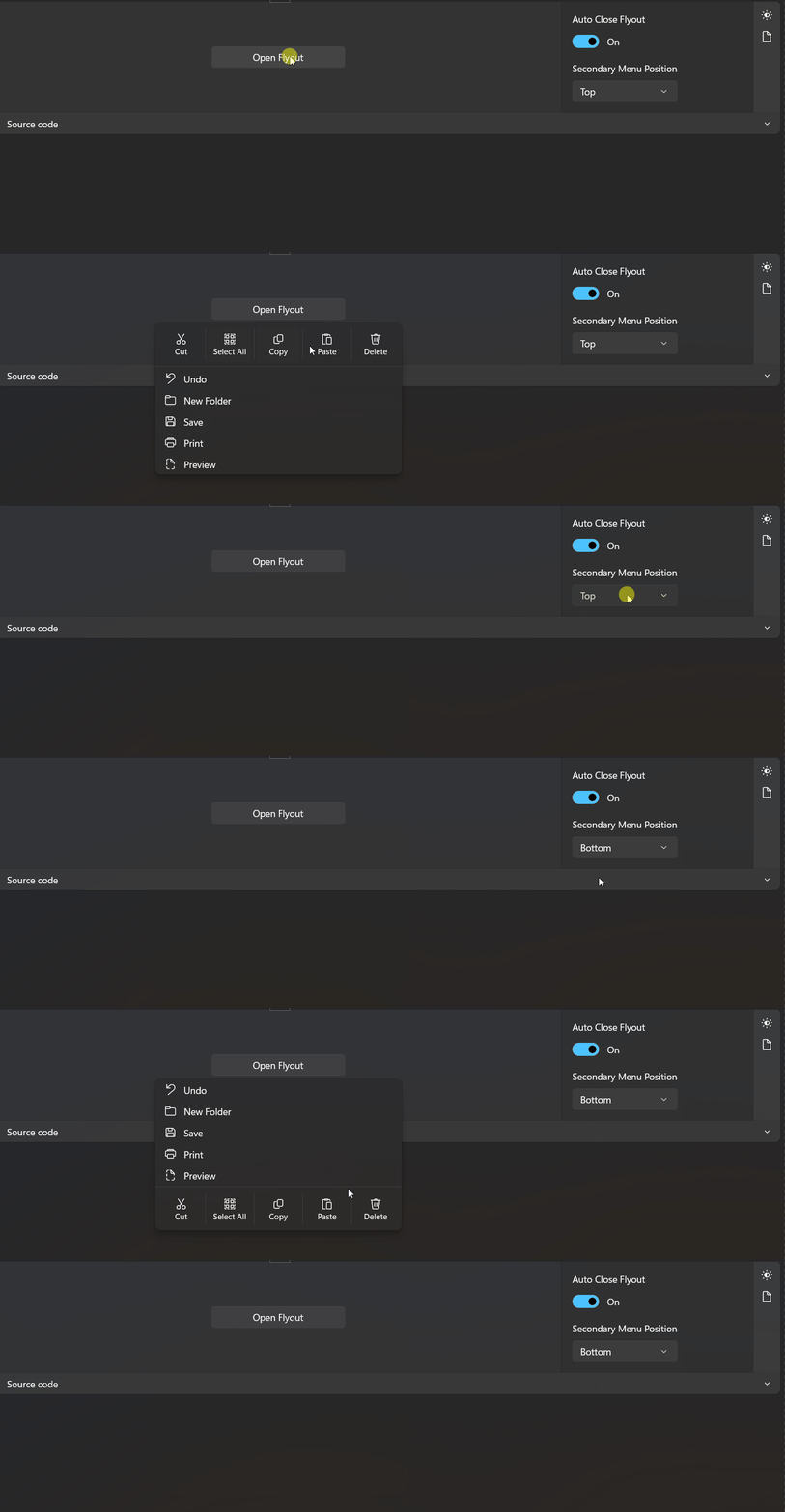
Demo
you can run demo and see this feature.