
This control can be used when you want to arrange notification information from top to bottom in the right area of the window.
Control effect
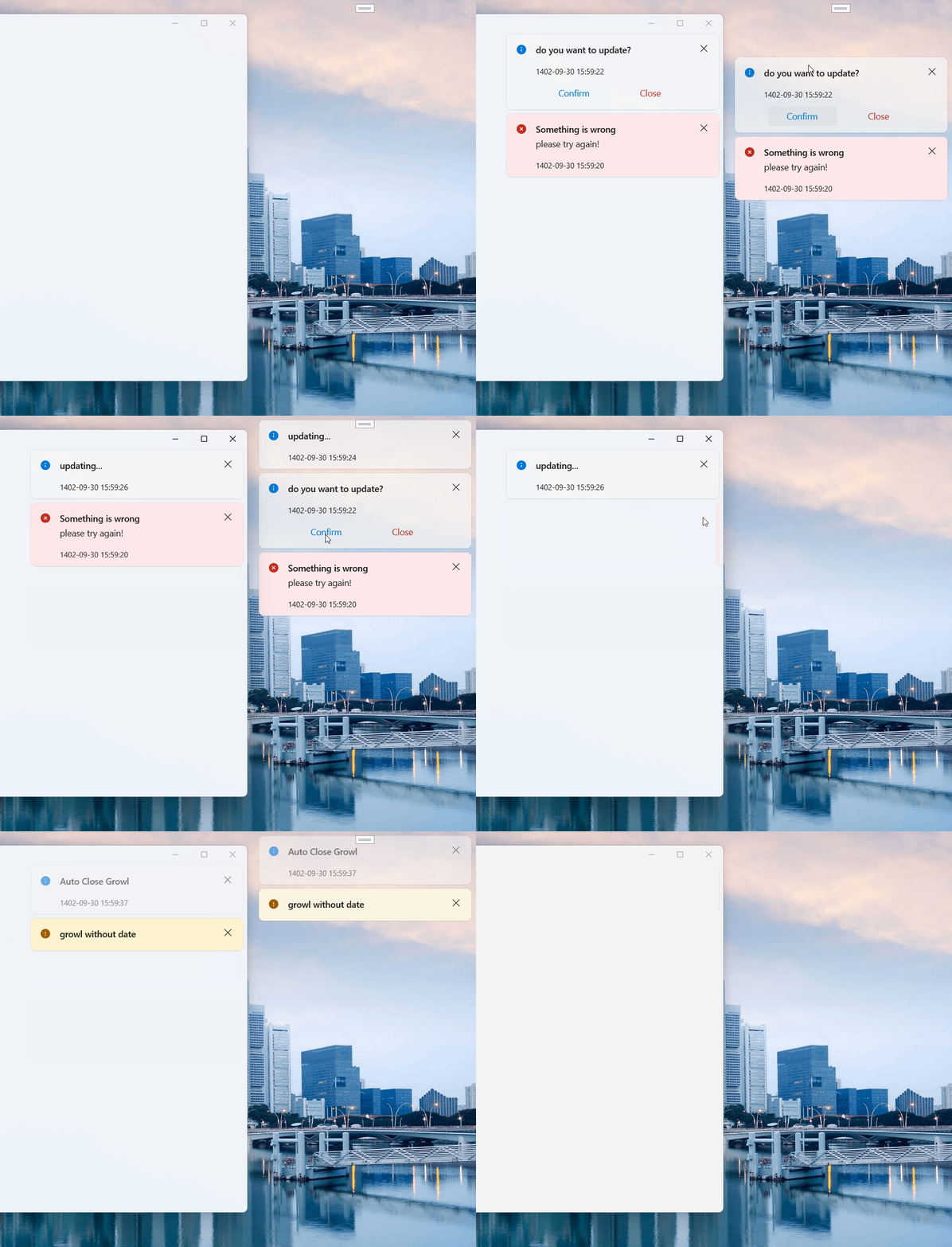
Basic usage
Step 1: Add a StackPanel to the container of Growl
<ScrollViewer VerticalScrollBarVisibility="Hidden" HorizontalAlignment="Right">
    <StackPanel dev:Growl.GrowlParent="True" VerticalAlignment="Top" Margin="0,10,10,10"/>
</ScrollViewer>
In order to facilitate scrolling, a ScrollViewer is usually wrapped in the outer layer. At the same time, for the sake of beauty, we set VerticalScrollBarVisibility="Hidden" of ScrollViewer. It is best to add a suitable Margin to StackPanel, which is also for aesthetics.
WARNING
Note the code dev:Growl.GrowlParent="True"。
Step 2: Call the relevant interface of Growl to display the specified message.
NOTE
Use case: Growl.Success("File saved successfully!");
Display information notifications in any StackPanel container
Step 1: set a Token to the StackPanel
<ScrollViewer VerticalScrollBarVisibility="Hidden" HorizontalAlignment="Right">
    <StackPanel dev:Growl.Token="SuccessMsg" dev:Growl.GrowlParent="True" VerticalAlignment="Top" Margin="0,10,10,10"/>
</ScrollViewer>
WARNING
Note the codedev:Growl.Token="SuccessMsg"。
Step 2: Use the token: SuccessMsg and call the relevant interface of Growl to display the specified message.
NOTE
Example:Growl.Success("File saved successfully!", "SuccessMsg");
WARNING
Now the "File saved successfully!" message will only be sent to the StackPanel container with the "SuccessMsg" token tag.
Global Usage
you can use growl in desktop Not just the app itself In this case you don't need anything just use Growl.XXXGlobal to display the message
Growl.InfoGlobal("GrowlInfo");
//OR
Growl.SuccessGlobal("GrowlSuccess");
// OR
Growl.WarningGlobal(new GrowlInfo
            {
                Message = "GrowlWarning",
                ActionBeforeClose = isConfirmed =>
                {
                    Growl.InfoGlobal(isConfirmed.ToString());
                    return true;
                }
            });
// OR
Growl.ErrorGlobal("GrowlError");

// And for Clearing growls
Growl.ClearGlobal();
Attributes
| Property | Description |
|---|---|
| GrowlPanel | Currently used message container |
Additional attribute
| Name | Description |
|---|---|
| Token | Used to set message tags |
| GrowlParent | for setting up message containers |
| GrowlEnterTransition | |
| GrowlExitTransition | |
| RootGridMargin |
Method
| Name | Description |
|---|---|
| Info(string title) | |
| Info(string title, string message) | |
| Info(GrowlInfo growlInfo) | |
| InfoWithToken(string title, string token) | |
| InfoWithToken(string title, string message, string token) | |
| InfoGlobal(string title) | |
| InfoGlobal(string title, string message) | |
| InfoGlobal(GrowlInfo growlInfo) | |
| Info2(string title) | |
| Info2(string title, string message) | |
| Info2WithToken(string title, string token) | |
| Info2WithToken(string title, string message, string token) | |
| Info2Global(string title) | |
| Info2Global(string title, string message) | |
| Success(string title) | |
| Success(string title, string message) | |
| Success(GrowlInfo growlInfo) | |
| SuccessWithToken(string title, string token) | |
| SuccessWithToken(string title, string message, string token) | |
| SuccessGlobal(string title) | |
| SuccessGlobal(string title, string message) | |
| SuccessGlobal(GrowlInfo growlInfo) | |
| Warning(string title) | |
| Warning(string title, string message) | |
| Warning(GrowlInfo growlInfo) | |
| WarningWithToken(string title, string token) | |
| WarningWithToken(string title, string message, string token) | |
| WarningGlobal(string title) | |
| WarningGlobal(string title, string message) | |
| WarningGlobal(GrowlInfo growlInfo) | |
| Error(string title) | |
| Error(string title, string message) | |
| Error(GrowlInfo growlInfo) | |
| ErrorWithToken(string title, string token) | |
| ErrorWithToken(string title, string message, string token) | |
| ErrorGlobal(string title) | |
| ErrorGlobal(string title, string message) | |
| ErrorGlobal(GrowlInfo growlInfo) | |
| Ask(string title, Func<object, RoutedEventArgs, bool> actionBeforeClose) | |
| AskWithToken(string title, string token, Func<object, RoutedEventArgs, bool> actionBeforeClose) | |
| AskGlobal(string title, Func<object, RoutedEventArgs, bool> actionBeforeClose) | |
| Clear | |
| ClearGlobal |
GrowlInfo
| Name | Description |
|---|---|
| Title | |
| Message | |
| DateTime | |
| ConfirmButtonText | |
| CloseButtonText | |
| Token | |
| Content | |
| Severity | |
| IconSource | |
| IsClosable | |
| ShowCloseButton | |
| ShowConfirmButton | |
| ShowDateTime | |
| StaysOpen | |
| IsIconVisible | |
| UseBlueColorForInfo | |
| WaitTime | |
| ConfirmButtonClicked | |
| CloseButtonClicked |
Note
Error and Warning modes are not turned off automatically.
FAQ
NOTE
Ask is special, what?
The main focus of the Ask method is the second parameter, its type is Func<bool, bool>, let's look at the sample code:
Growl.Ask("do you want to update?", (s, e) =>
{
    Growl.Info("test");
    return true;
});
By using the Ask method, the "confirm" and "cancel" buttons are displayed by default. When you click "confirm", the value of isConfirmed in the above code is true, and clicking "cancel" is false", which can be based on isConfirmed The value of takes the corresponding action. Finally, if you returntrue, the Growl notification will be closed, and if false` is returned, it will not be closed.
Demo
you can run demo and see this feature.