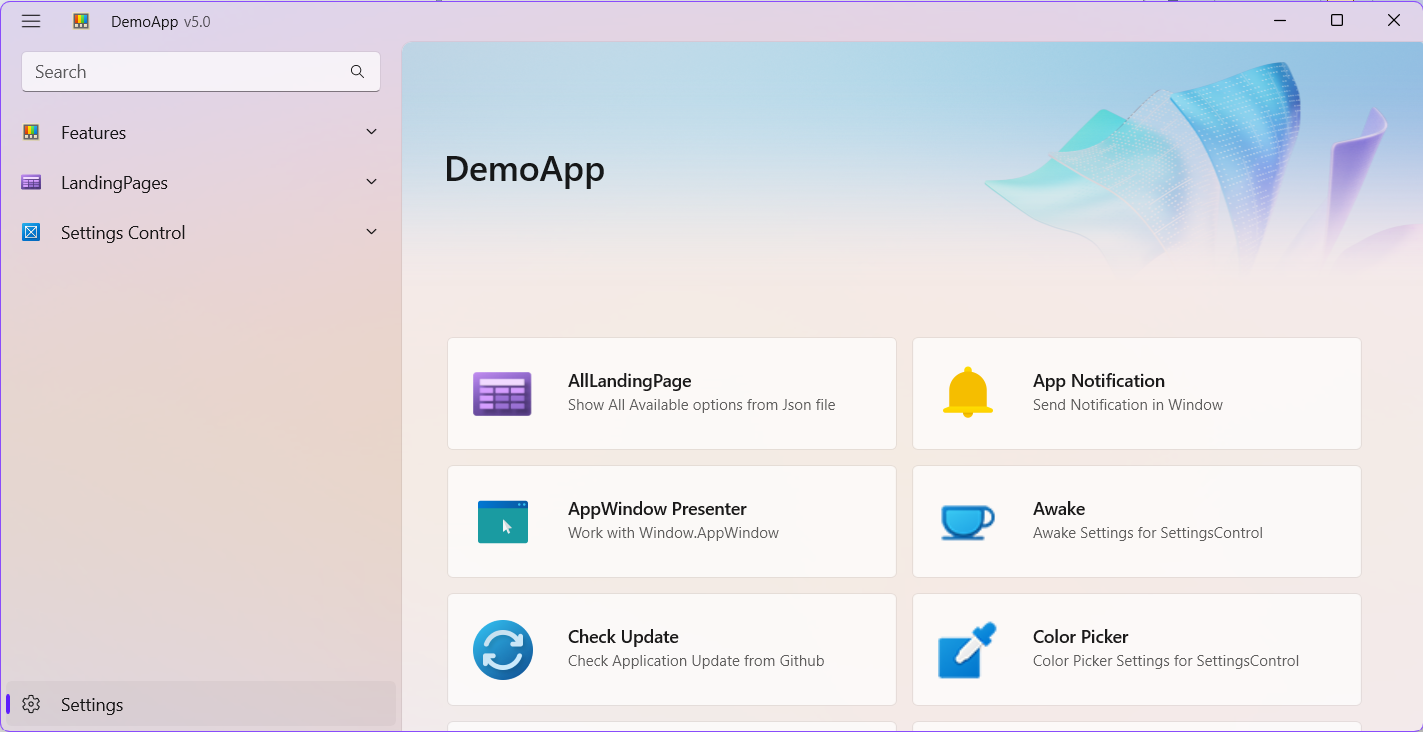
in this page we can load only items that is tagged as IsNew, IsUpdated and IsPreview.
Events
| Name |
|---|
| OnItemClick |
Available Properties
| Name |
|---|
| HeaderImageHeight |
| HeaderImage |
| HeaderSubtitleFontSize |
| HeaderSubtitleText |
| HeaderFontSize |
| HeaderText |
| Stretch |
| GridViewPadding |
| IsTileImage |
| FooterContent |
| FooterMargin |
| PreviewGroupText |
| UpdatedGroupText |
| NewGroupText |
| HeaderContent |
Override values
xml
<x:Double x:Key="LandingItemTitleFontSize">14</x:Double>
<x:Double x:Key="LandingItemSubtitleFontSize">12</x:Double>
Simple Use
first add:
xml
xmlns:dev="using:DevWinUI"then use MainLandingPage:
xml
<dev:MainLandingPage x:Name="mainLandingPage" Loaded="mainLandingPage_Loaded"
                        HeaderImage="ms-appx:///Assets/GalleryHeaderImage.png"
                        HeaderText="Demo App"
                        HeaderSubtitleText="Based On WinAppSDK 1.7+"
                        OnItemClick="mainLandingPage_OnItemClick">
    <dev:MainLandingPage.HeaderContent>
        <StackPanel Orientation="Horizontal" Spacing="10">
            <dev:HeaderTile
                    Title="Documentation Center"
                    Description="Learn how to work with controls and styles."
                    Link="https://Ghost1372.github.io/DevWinUI/">
                <dev:HeaderTile.Source>
                    <Image Source="/Assets/HomeHeaderTiles/Header-WinUIGallery.png" />
                </dev:HeaderTile.Source>
            </dev:HeaderTile>
            <dev:HeaderTile
                    Title="DevWinUI"
                    Description="Experience WinUI 3 quickly and easily with the help of DevWinUI, Everything you need to develop an application is gathered in one place."
                    Link="https://github.com/Ghost1372/DevWinUI">
                <dev:HeaderTile.Source>
                    <Image Source="/Assets/HomeHeaderTiles/icon.png" />
                </dev:HeaderTile.Source>
            </dev:HeaderTile>
            <dev:HeaderTile
                    Title="Core"
                    Description="Experience WinUI 3 quickly and easily with the help of Core, Everything you need to develop an application is gathered in one place."
                    Link="https://github.com/Ghost1372/DevWinUI">
                <dev:HeaderTile.Source>
                    <Image Source="/Assets/HomeHeaderTiles/icon.png" />
                </dev:HeaderTile.Source>
            </dev:HeaderTile>
            <dev:HeaderTile
                    Title="ContextMenuExtensions"
                    Description="add a new ContextMenu for Windows 11/10."
                    Link="https://github.com/Ghost1372/DevWinUI">
                <dev:HeaderTile.Source>
                    <Image Source="/Assets/HomeHeaderTiles/icon.png" />
                </dev:HeaderTile.Source>
            </dev:HeaderTile>
        </StackPanel>
    </dev:MainLandingPage.HeaderContent>

    <dev:MainLandingPage.FooterContent>
        <StackPanel>
            <TextBlock x:Name="LearnMore" Text="Learn More" Foreground="{ThemeResource ApplicationForegroundThemeBrush}" Style="{StaticResource SubtitleTextBlockStyle}" Margin="0,0,0,12" />
            <HyperlinkButton Content="Developer Center" NavigateUri="https://developer.microsoft.com/en-us/windows/"/>
            <HyperlinkButton Content="App Code Samples" NavigateUri="https://docs.microsoft.com/en-us/windows/apps/get-started/samples"/>
            <HyperlinkButton Content="Windows Template Studio" NavigateUri="https://github.com/microsoft/WindowsTemplateStudio"/>
        </StackPanel>
    </dev:MainLandingPage.FooterContent>
</dev:MainLandingPage>
Load Items from Json File
if you want to load items to a gridview, you need to Create a folder for example DataModel then add a new json file AppData.json: DataModel\AppData.json
WARNING
Set BuildAction to Content, if you are in a Unpackaged Mode, set CopyToOutput to True
NOTE
For a complete list of available properties and the full JSON structure, please refer to the JSON File Structure Documentation.
json
{
  "Groups": [
    {
      "UniqueId": "Features",
      "Title": "Features pages",
      "IsSpecialSection": false,
      "Items": [
        {
          "UniqueId": "DevWinUI.DemoApp.Pages.ApplicationDataContainerPage",
          "Title": "ApplicationDataContainer",
          "SecondaryTitle": "Test SecondaryTitle",
          "Subtitle": "you can use ApplicationDataContainerHelper for saving and loading application settings.",
          "ImagePath": "ms-appx:///Assets/Modules/PT.png",
          "Description": "test description",
          "IsUpdated": true,
          "IncludedInBuild": true,
          "Links": [
            {
              "Title": "ApplicationDataContainerPage",
              "Uri": "https://Ghost1372.github.io/DevWinUI/helpers/applicationDataContainerHelper/"
            }
          ],
          "Extra": [
            "AppBarToggleButton",
            "AppBarSeparator",
            "CommandBar"
          ]
        },
        {
          "UniqueId": "DevWinUI.DemoApp.Pages.AppNotificationPage",
          "Title": "App Notification",
          "SecondaryTitle": "Test SecondaryTitle",
          "Subtitle": "you can use AppNotificationPage for Sending Toast Notification.",
          "ImagePath": "ms-appx:///Assets/Modules/PT.png",
          "IncludedInBuild": true,
          "Links": [
            {
              "Title": "AppNotificationPage",
              "Uri": "https://Ghost1372.github.io/DevWinUI/helpers/appNotification/"
            }
          ]
        },
      ]
    },
    {
      "UniqueId": "Settings",
      "Title": "Settings pages",
      "SecondaryTitle": "Test SecondaryTitle",
      "Items": [
        {
          "UniqueId": "DevWinUI.DemoApp.Pages.OobePage",
          "Title": "Oobe Page",
          "ApiNamespace": "DemoApp",
          "SecondaryTitle": "Test SecondaryTitle",
          "Subtitle": "Settings Page with a Hero Image",
          "ImagePath": "ms-appx:///Assets/Modules/PT.png",
          "IsUpdated": true,
          "IncludedInBuild": true,
        }
      ]
    }
  ]
}
Normal
cs
protected override void OnNavigatedTo(NavigationEventArgs e)
{
    base.OnNavigatedTo(e);
    mainLandingPage.GetDataAsync("DataModel/AppData.json");
}
if you want to navigate to another page:
cs
private void mainLandingPage_OnItemClick(object sender, RoutedEventArgs e)
{
    var args = (ItemClickEventArgs)e;
    var item = (DataItem)args.ClickedItem;
    jsonNavigationService.NavigateTo(item.UniqueId);
}
Enable/Disable Items based on Page Exist / IncludedInBuild
you can simply enable/disable items in AppData.json file just set IncludedInBuild to true or false